TrainingSkill
How to reply to a campaign
Reply once to every boilerplate campaign email, and read the ones where a constituent added their own words before you send.
- Skill
- Caseworker
- Parliamentary researcher
- Campaigns
- Bulk replies
- Templates
No account yet? Start a free trial
Open the campaign
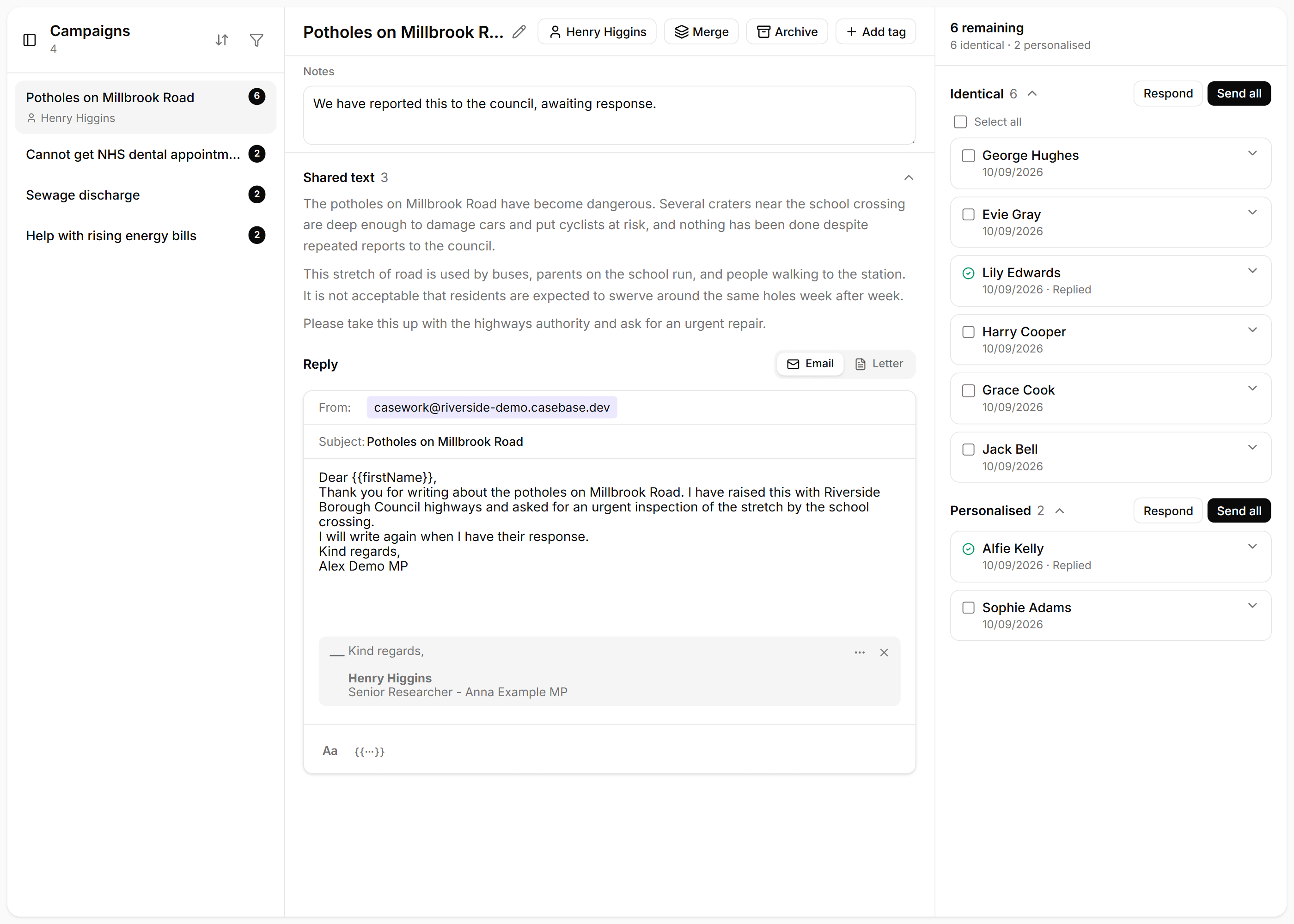
In Inbox, choose Campaigns. Emails that share the same template are already grouped. Open the campaign with the most remaining.
Write the reply once
The reply sits on the left. Shared text is the wording CaseBase treated as the campaign itself. Write the answer once, type {{ to insert a name or other detail, and add the signature that should go on the email.
Send the identical emails
On the right, Identical means the constituent sent the template and nothing more. Choose Send all. CaseBase shows who will receive it before it goes.
Read the personalised ones
Personalised means they added their own words. Choose Respond and read that note before you send. Change the reply where their words need a different answer.